---
title: "Preparing for Your Virtual Classroom: A Student’s Guide"
description: Hi, teachers! Before your upcoming class, feel free to send out the following to your students to ensure they are prepared for your class and can navigate the virtual classroom with ease.
---
[Skip to content](https://info.hilink.ai/student-support#main-content)
English
Show submenu for translations
[](https://hilink.ai)
Open main navigation
Close main navigation
- English
Show submenu for translations
Hello. How can we help you?
- There are no suggestions because the search field is empty.
1. [Help Center](https://info.hilink.ai/?hsLang=en)
2. [Product](https://info.hilink.ai/product?hsLang=en)
3. [Getting Started](https://info.hilink.ai/product?hsLang=en#getting-started)
# Preparing for Your Virtual Classroom: A Student’s Guide
Hi, teachers! Before your upcoming class, feel free to send out the following to your students to ensure they are prepared for your class and can navigate the virtual classroom with ease:
### **Pre-class Checklist**
 **Device:** A laptop, desktop, or tablet with a webcam and microphone.
 **Browser:** Ensure you have a recent version of Chrome (recommended) or Safari web browser installed.
 **Internet:** Make sure you have a strong internet connection with at least 5 Mbps+ download and upload speed.
### **Three Steps to Start a Class**
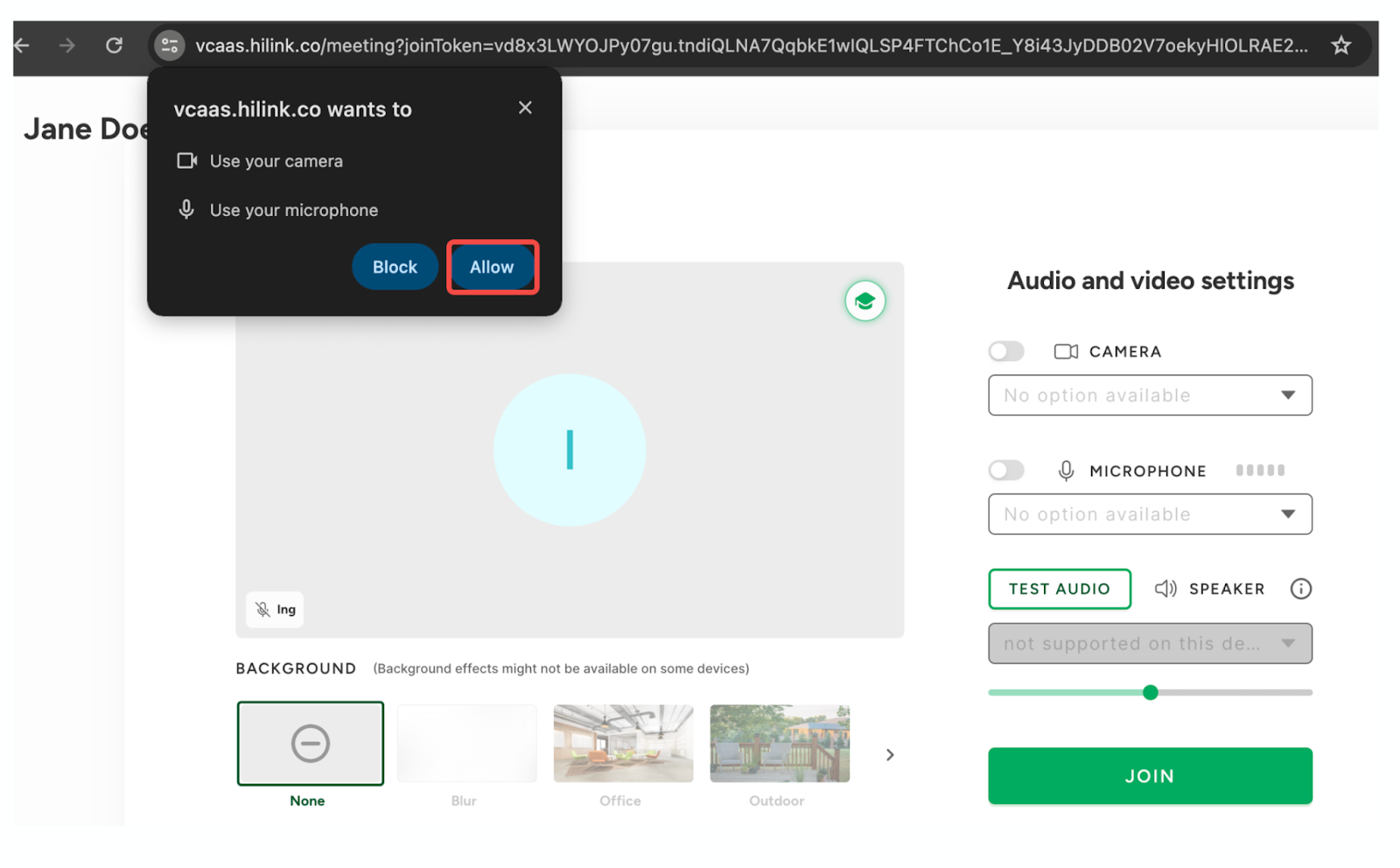
**Step 1:** Grant permission for the microphone and camera to ensure smooth audio and video during class.
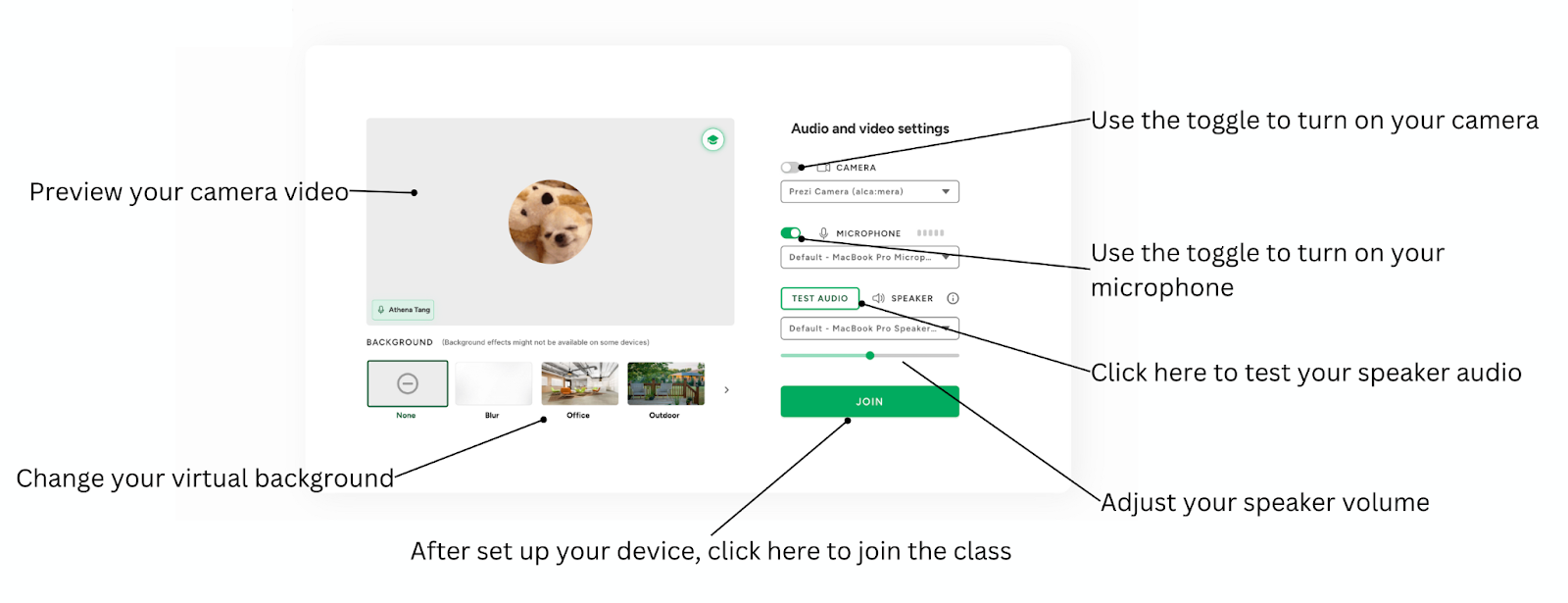
**Step 2:** Adjust audio and video settings to your preference.
**Step 3:** Wait in the virtual waiting room until the teacher admits you to the class.
### **FAQ: What Can Students Do?**
- Actively participate in class via camera and microphone.
- Share your screen, videos, and any documents to contribute to the class.
- Raise your hand to ask questions or use reactions to engage with the class.
- Write, draw, and interact with the class on the virtual whiteboard for collaborative activities.
- Communicate with other participants using the chat function for discussions and questions.
- Add virtual backgrounds to your video feed.
- Switch Views for the best classroom experience:
- Whiteboard view (default view) offers draggable and resizable video windows for customizable collaboration and full-screen sharing.
- Sidebar view is ideal for balancing participant video and classroom content, providing easy access to everything side-by-side.
- Gallery view is perfect for larger classrooms, allowing you to see multiple participants simultaneously.
- [FAQs](https://info.hilink.ai/faqs?hsLang=en)
- [Product](https://info.hilink.ai/product?hsLang=en#main-content)
- [Getting Started](https://info.hilink.ai/product?hsLang=en#getting-started)
- [Virtual Classroom & Whiteboard](https://info.hilink.ai/product?hsLang=en#virtual-classroom-whiteboard)
- [AI Tools](https://info.hilink.ai/product?hsLang=en#ai-tools)
- [Course Management](https://info.hilink.ai/product?hsLang=en#course-management)
- [Tutorial](https://info.hilink.ai/product?hsLang=en#tutorial)
- [Troubleshooting](https://info.hilink.ai/product?hsLang=en#troubleshooting)
- [Resources](https://info.hilink.ai/resources?hsLang=en#main-content)
- [Demos & Tutorials](https://info.hilink.ai/resources?hsLang=en#demos-tutorials)
- [Product Releases](https://info.hilink.ai/resources?hsLang=en#product-releases)
[](https://info.hilink.co/)
Help Center
Copyright © 2026, HiLink Inc.